
The most reliable way to identify the userAccountControl state in scoping is to use its property flags within a bitwise expression.
For example, to scope on accounts where the ACCOUNTDISABLE flag is set, the relevant flag value is 0x0002 in hexadecimal (decimal: 2). A disabled account typically has a userAccountControl value of 0x0202 (decimal: 514), which combines ACCOUNTDISABLE (0x0002) and NORMAL_ACCOUNT (0x0200). Rather than matching the full value of 514 — which would miss accounts with additional flags set — use the bitwise expression below to check only for the ACCOUNTDISABLE flag. Decimal flag values are listed in the Microsoft reference article linked below.
Attribute: UserAccountControl
Logic: “expression is true”
Value: (value & 2) == 2
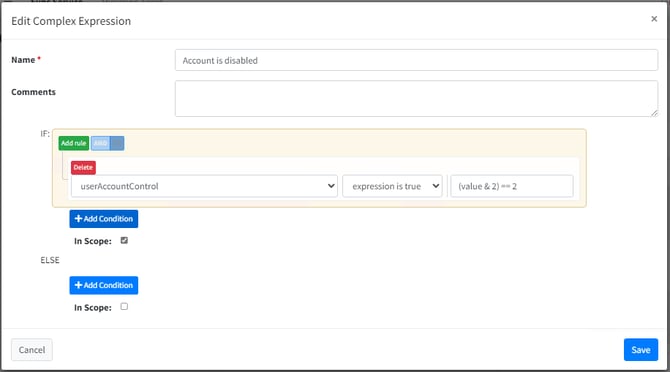
Note: If an account is moved out of scope due to a state change, review your configuration to ensure all scenarios are handled — for example, you may not want the account deleted from the target system when it becomes disabled. Use the What If feature to validate your scoping logic before applying changes.
Further Reading
Microsoft provide more details on the values here.
UserAccountControl property flags - Windows Server | Microsoft Learn
There are further hexadecimal value states here
Understanding the UserAccountControl Attribute in Active Directory - Microsoft Community Hub
Examples of other important attributes
Active Directory (AD) attributes that use hexadecimal values are primarily those that involve unique identifiers, security settings, timestamps, and specific configurations.
Below are some of the key AD attributes that typically use or display hexadecimal values, they will not all conform to the same values as userAccountControl, each have their own newances.
objectGUID:
- Description: A globally unique identifier for the object.
- Hexadecimal Format: It is a binary large object (BLOB) and often represented as a hexadecimal string.
objectSID:
- Description: Security Identifier for the object.
- Hexadecimal Format: It is stored as a binary value and often displayed in hexadecimal.
userAccountControl:
- Description: Flags that control the behaviour of user accounts.
- Hexadecimal Format: Often represented in hexadecimal to denote various control flags.
pwdLastSet:
- Description: The timestamp for the last password set.
- Hexadecimal Format: While it represents a timestamp, it is often displayed in hexadecimal in certain tools.
unicodePwd:
- Description: Encrypted password of the user.
- Hexadecimal Format: Stored in an encoded format that is often shown as hexadecimal.
supplementalCredentials:
- Description: Stores additional credential information for the user.
- Hexadecimal Format: Typically stored in a binary format, displayed as hexadecimal.
logonHours:
- Description: Specifies the hours during which the user is allowed to log on.
- Hexadecimal Format: Represented as a bit string, often shown in hexadecimal.
userParameters:
- Description: Stores user-specific configuration data.
- Hexadecimal Format: Encoded in a format that may be displayed as hexadecimal.
msDS-KeyVersionNumber:
- Description: Indicates the version number of the key.
- Hexadecimal Format: Stored and displayed in hexadecimal format.
ms-Mcs-AdmPwd:
- Description: Stores the local administrator password managed by the legacy Microsoft LAPS solution (Windows Server 2012 R2 and earlier environments). Note: Windows LAPS (introduced in 2023) uses the msLAPS-Password attribute instead.
- Hexadecimal Format: Stored in a secure format, often represented in hexadecimal.
ntSecurityDescriptor:
- Description: Contains the security descriptor for the object.
- Hexadecimal Format: Stored as a binary value, often shown in hexadecimal for analysis.
replUpToDateVector:
- Description: Used in replication, stores the highest update sequence number (USN) applied from each replication partner.
- Hexadecimal Format: Stored as a binary value, often represented in hexadecimal.
These attributes are essential for various administrative and security-related functions in Active Directory. The hexadecimal representation helps in standardizing and simplifying the storage and display of complex binary data.