
The Scenario
When performing an Active Directory migration into a Windows Server 2025 environment, administrators often rely on PowerSyncPro's Legacy Password Sync feature to seamlessly transition user credentials.
Legacy Password Sync works by reading the existing NT hash (which relies on RC4 encryption) from the source Active Directory and writing it directly to the target Active Directory.
The Problem: Windows Server 2025 Kerberos Hardening
Microsoft has been aggressively deprecating the use of RC4 due to security vulnerabilities, rolling out cumulative Kerberos hardening updates that actively reject RC4-encrypted tickets.
In Windows Server 2025, RC4 encryption is disabled by default (defaulting strictly to AES-only). Because of this, if you use Legacy Password Sync to write an RC4 password hash to a Server 2025 domain controller, the synchronization will appear to complete successfully, and the password hash will be present on the target object. However, devices and users attempting to authenticate against the 2025 Domain Controllers will fail to log in because the Kerberos Key Distribution Center (KDC) will outright reject the RC4 encryption type.
⚠️ Critical Security Warning: The Risks of Enabling RC4
Explicitly re-enabling RC4 in your environment goes against Microsoft's recommended security practices and will lower the overall security posture of your domain. RC4 is a legacy cryptographic algorithm with known vulnerabilities.
Before proceeding with the steps below, we strongly advise reviewing Microsoft's official documentation: How to Manage RC4 Hardening – Definitive Guide.
💡 Tip: Modern Password Sync Alternative
If your security posture strictly prohibits re-enabling RC4 in your new Server 2025 environment, you cannot use Legacy Password Sync. Instead, you must use PowerSyncPro's Modern Password Sync, which securely captures and synchronizes AES/SHA hashes by installing the Remote Password Sync Agent on all source Domain Controllers.
Important Behavioral Difference: Legacy Password Sync is a "lift and shift" approach that instantly copies the existing password hash to the target. Modern Password Sync, however, intercepts new passwords in near real-time, meaning it is sync-on-change only. Users will be required to change their password in the source environment before it can be captured and synchronized to the target.
The Solution: Re-Enabling RC4 Support
If your migration strategy requires Legacy Password Sync and you accept the associated security risks, you must explicitly configure your target Windows Server 2025 environment to accept RC4 encryption.
This requires two separate configuration changes on your target Domain Controllers: updating a Group Policy Object (GPO) and injecting a specific KDC Registry Key.
Step 1: Configure the Allowed Encryption Types GPO
You must first update the Default Domain Controllers Policy to advertise that the domain supports RC4.
- Log on to a target Windows Server 2025 Domain Controller as an Administrator.
- Open Group Policy Management.
- Navigate to your target domain -> Domain Controllers -> right-click Default Domain Controllers Policy and select Edit.
- In the Group Policy Management Editor, navigate to:
Computer Configuration > Policies > Windows Settings > Security Settings > Local Policies > Security Options. - Locate the policy named Network security: Configure encryption types allowed for Kerberos.
- Double-click the policy to edit it. Ensure the following encryption types are checked (which sets the underlying value to
0x7FFFFFFCto support RC4):- RC4_HMAC_MD5
- AES128_HMAC_SHA1
- AES256_HMAC_SHA1
- Future encryption types
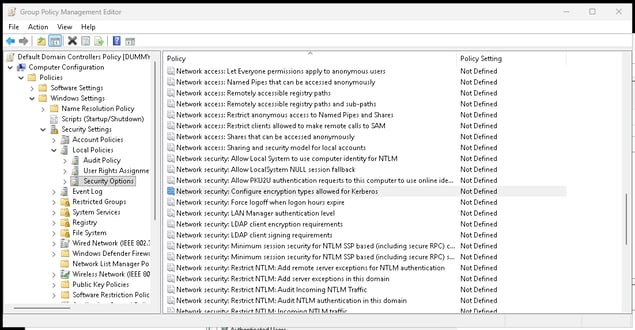 Location of GPO in Default Domain Controllers Policy
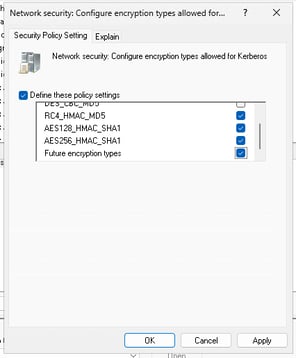 Kerberos GPO Settings
- Click Apply and OK.
- Open an elevated command prompt and run
gpupdate /forceto apply the policy.
Step 2: Set the DefaultDomainSupportedEncTypes Registry Key
Even with the GPO applied, you must explicitly instruct the Kerberos service (KDC) to allow RC4 and AES session keys by modifying the registry.
Note: This registry key must be added to all Windows Server 2025 Domain Controllers in your target environment.
- Open the Registry Editor (
regedit.exe) on your target Domain Controller. - Navigate to the following path:
HKEY_LOCAL_MACHINE\Software\Microsoft\Windows\CurrentVersion\Policies\System\Kerberos\Parameters(Note: On older OS versions, this is typically located atHKLM\SYSTEM\CurrentControlSet\Services\Kdc). - Look for the
DefaultDomainSupportedEncTypesvalue. If it does not exist, right-click and create a new DWORD (32-bit) Value namedDefaultDomainSupportedEncTypes. - Double-click
DefaultDomainSupportedEncTypesand set the Hexadecimal value data to1c.- Setting this to
0x1Cexplicitly enables RC4-HMAC, AES128-CTS-HMAC-SHA1-96, and AES256-CTS-HMAC-SHA1-96.
- Setting this to
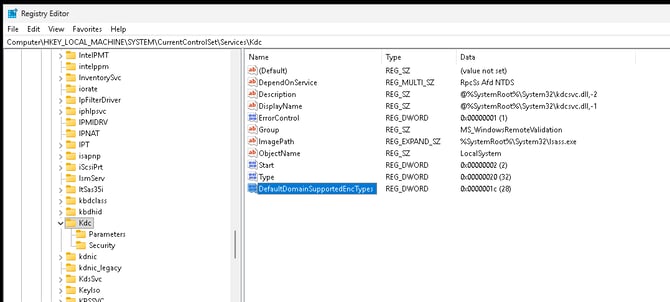 Example DefaultDomainSupportedEncTypes Registry Key
- Click OK and close the Registry Editor.
- Restart the Domain Controller to ensure the KDC service fully initializes with the new allowed encryption types.
Once the domain controllers reboot, your users will be able to successfully authenticate against the Windows Server 2025 domain using the RC4 passwords synchronized via PowerSyncPro's Legacy Password Sync.