
Problem / Error
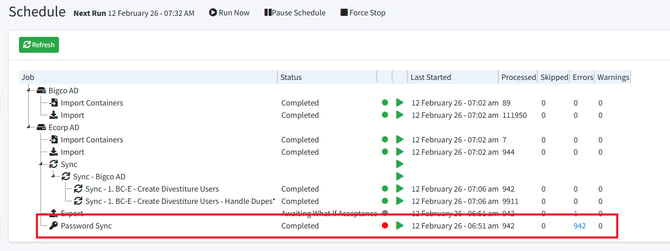
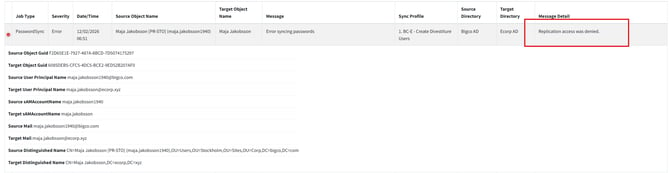
When attempting to synchronize passwords between Active Directory domains, you get an error in the PowerSyncPro Message logs reporting that:
Replication access was denied.
From Schedule:
From Message Logs:
Solution
In order to synchronize passwords, your PowerSyncPro service account in the source domain must have permissions to replicate directory changes.
From the source domain:
- Launch AD Users and Computers
- Ensure that Advanced Features are enabled under the “View” menu
- Right click on the root of the target Active Directory Domain (e.g. ecorp.xyz) and select Properties.
- Click the Security Tab
- Add your PowerSyncPro Service account to the permissions list.
- Allow:
- Replicating Directory Changes
- Replicating Directory Changes All
- Apply Settings and test.
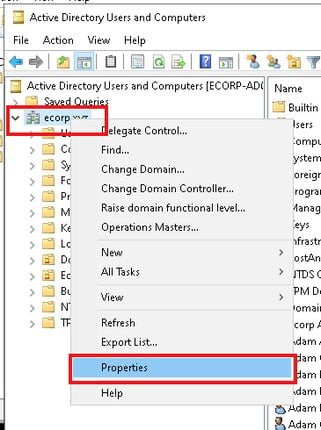
|
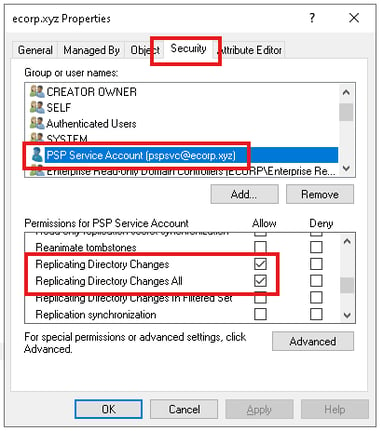
|
For the target domain:
Ensure that your target domain service account has full control over user accounts. This can be via Domain Admin, or more granular permissions. We must be able to modify the RC4 password for users in the target domain.
Verification
Once permissions are verified on the source and target, from the PowerSyncPro schedule panel right click the “Password Sync” option and start the job. It should complete without errors.
