
Problem / error
When attempting to synchronize passwords between Active Directory domains, you get an error in the PowerSyncPro Message logs reporting that:
Error message: Replication access was denied.
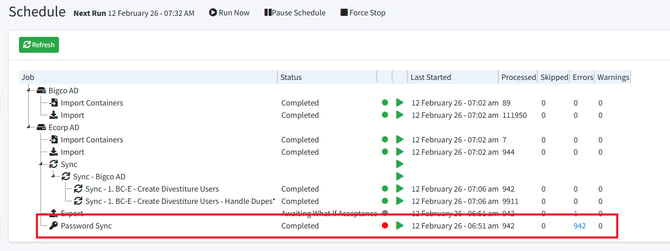
From Schedule:
From Message Logs:
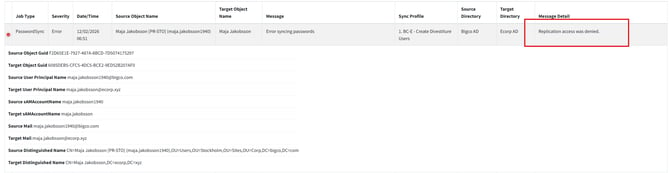
Solution
To fix this error, the PowerSyncPro service account in the source domain must be granted permission to replicate directory changes. You will also need to ensure the service account in the target domain has sufficient permissions to modify user accounts.
From the source domain:
- Launch AD Users and Computers
- Ensure that Advanced Features are enabled under the “View” menu
- Right-click on the root of the source Active Directory domain (e.g. ecorp.xyz) and select Properties.
- Click the Security Tab
- Add your PowerSyncPro Service account to the permissions list.
- Allow:
- Replicating Directory Changes
- Replicating Directory Changes All
- Apply Settings and test.
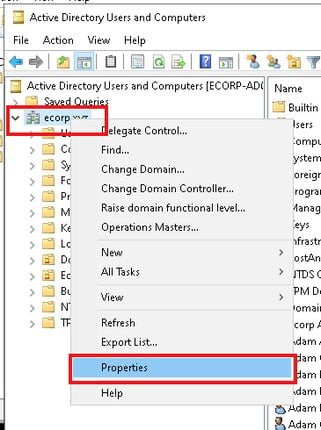
|
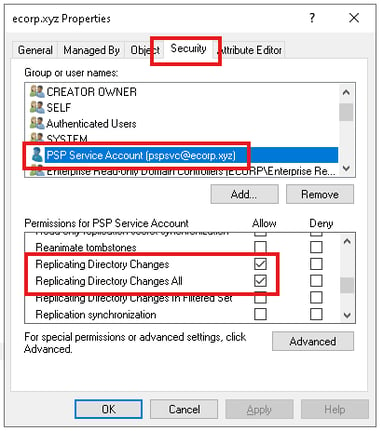
|
For the target domain:
Ensure that the PowerSyncPro service account in the target domain has sufficient permissions to modify user accounts. This can be achieved by assigning Domain Admin rights, or by granting more granular permissions. At minimum, the account must have permission to write the unicodePwd attribute for user objects in the target domain.
Verification
Once permissions have been configured on both the source and target domains, go to the PowerSyncPro schedule panel, right-click Password Sync, and select Start. The job should complete without errors. If the error persists, review the Message Logs for additional detail or contact PowerSyncPro support.
