
Overview
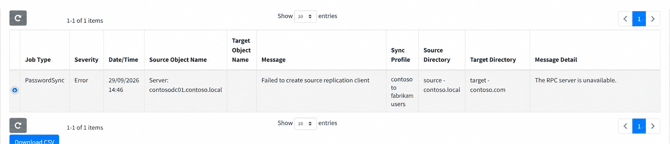
When executing a PowerSyncPro Directory Synchronization job configured for Legacy Password Sync, the synchronization job may fail during the password replication phase with one of the following errors:
Failed to create source replication client: The RPC server is unavailable.Failed to create target replication client: The RPC server is unavailable.
This issue frequently causes confusion during pre-migration testing because basic network diagnostics (such as Test-NetConnection -Port 135) report successful connectivity. However, RPC communication for Active Directory replication requires more than just the RPC Endpoint Mapper port.
Root cause
Legacy Password Sync utilizes Active Directory Directory Replication Service (DRSUAPI) RPC calls to extract and replicate password hashes between Domain Controllers.
Under the hood, Windows RPC negotiation operates in a two-stage handshake:
- Endpoint Mapping (TCP 135): The PowerSyncPro server (or Remote Sync Agent) connects to the RPC Endpoint Mapper on the target Domain Controller via TCP 135.
- Dynamic Port Allocation: The Endpoint Mapper registers the Active Directory Replication interface (
DRSUAPI) and returns a dynamically allocated high-range TCP port. - Replication Stream Binding: PowerSyncPro attempts to establish a direct connection to that dynamic high port to initiate the replication client.
The Problem: In hardened corporate networks, internal firewalls frequently allow TCP 135 but block the outbound dynamic RPC high port range (TCP 49152–65535). While the initial port 135 query succeeds, the actual replication client creation fails when PowerSyncPro cannot reach the assigned dynamic port, throwing "The RPC server is unavailable."
Step-by-step diagnostic and verification
1. Avoid misleading diagnostics
- Do not rely solely on TCP 135 checks: A passing
Test-NetConnection -Port 135only proves the Endpoint Mapper is listening, not that dynamic RPC traffic is passing through your firewall.
2. Identify the active DRSUAPI dynamic port
To locate the exact dynamic port allocated for Active Directory replication on the Domain Controller, use Microsoft's command-line port scanner, PortQry:
📥 Tool Download: PortQry v2.0 is available directly from Microsoft: Download PortQry Command Line Port Scanner v2.0.
From the PowerSyncPro server or Remote Sync Agent host, query the Endpoint Mapper on the target Domain Controller and filter for the Active Directory Replication interface UUID (e3514235-4b06-11d1-ab04-00c04fc2dcd2):
.\portqry.exe -n dc1.contoso.com -e 135 -p TCP | Select-String -Pattern 'e3514235-4b06-11d1-ab04-00c04fc2dcd2' -Context 0,8 Sample Output:
> UUID: e3514235-4b06-11d1-ab04-00c04fc2dcd2 MS NT Directory DRS Interface
  ncacn_np:dc1.contoso.com[\pipe\lsass]

> UUID: e3514235-4b06-11d1-ab04-00c04fc2dcd2 MS NT Directory DRS Interface
  ncacn_ip_tcp:dc1.contoso.com[58032]

> UUID: e3514235-4b06-11d1-ab04-00c04fc2dcd2 MS NT Directory DRS Interface
  ncacn_http:dc1.contoso.com[58033]

> UUID: e3514235-4b06-11d1-ab04-00c04fc2dcd2 MS NT Directory DRS Interface
  ncacn_np:dc1.contoso.com[\pipe\136d116417a419f7]

  UUID: 12345778-1234-abcd-ef00-0123456789ab
  ncacn_np:dc1.contoso.com[\pipe\lsass]

  UUID: 12345778-1234-abcd-ef00-0123456789ab
  ncacn_ip_tcp:dc1.contoso.com[58032]
(In this example, look for the ncacn_ip_tcp binding under the DRS Interface—port 58032 is the active dynamic RPC port allocated for AD replication).
3. Test the dynamic RPC port directly
Test connectivity to the specific dynamic port identified in Step 2:
Test-NetConnection dc1.contoso.com -Port 58032 If TcpTestSucceeded returns False, your network firewall is actively dropping high-port RPC traffic.
Firewall and network port requirements
To resolve this error, ensure your network firewalls allow the following port ranges between the PowerSyncPro migration host and the source/target Active Directory Domain Controllers (specifically the Primary Domain Controller Emulators):
| Source Host | Destination Host | Protocol / Port | Purpose |
|---|---|---|---|
| PSP Server / Remote Sync Agent | Source & Target DCs | TCP 135 | RPC Endpoint Mapper |
| PSP Server / Remote Sync Agent | Source & Target DCs | TCP 49152–65535 | Dynamic RPC High Ports |
| PSP Server / Remote Sync Agent | Source & Target DCs | TCP 389 / 636 | LDAP / LDAPS |
Resolution options
- Open Dynamic RPC Range on Firewalls (Recommended for Legacy Sync): Update firewall rules between the PowerSyncPro server (or Remote Sync Agent host) and all Domain Controllers in scope to permit outbound TCP traffic on ports 49152–65535.
- Restrict RPC Dynamic Port Range via Registry (Optional): If network security policies prohibit opening the full 49152–65535 port range, you can restrict Active Directory RPC allocation on your Domain Controllers to a narrower custom port range (e.g., TCP 50000–50100) via the registry key
HKLM\SYSTEM\CurrentControlSet\Services\NTDS\Parameters(settingRPC issue port allocation). - Transition to Modern Password Sync: Modern Password Sync utilizes the lightweight PowerSyncPro Remote Password Agent installed directly on Domain Controllers. Modern Password Sync streams password hash updates securely over TCP 5001 / HTTPS and eliminates the need for legacy RPC replication calls over TCP 135 and dynamic RPC ports.