
The scenario
When running a directory synchronization job in PowerSyncPro to migrate SID History between on-premises Active Directory domains, the sync job may fail with an Unhandled exception and an Access is denied error in the message detail.
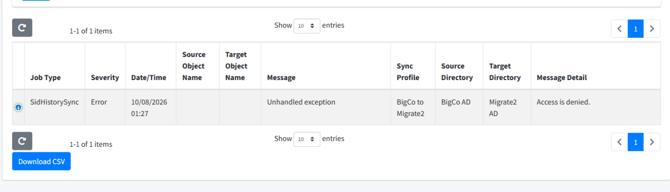
This error occurs even when all standard Active Directory prerequisites are fully met, every service account involved holds Domain Admin rights, basic connectivity between environments is verified as functional, and the SID History Migration: Prerequisite Checker shows all results as green..
Diagnosing the cause
If you encounter this failure, you can skip exhaustive permission audits. If the following two conditions are true, it is highly likely that an authentication mismatch is the root cause:
- Workgroup-Joined Host: The machine executing the migration—either the central PowerSyncPro Server or the Remote Sync Agent host—is workgroup-joined or joined to a domain that has no trust path enabling it to authenticate to the target domain.
- Windows Server 2025: PowerSyncPro is running on a server running Windows Server 2025 or later.
The cause: Kerberos vs. NTLM bindings
This issue is caused by a fundamental difference in how Windows handles authentication for standard file sharing versus active directory directory-replication interfaces:
- The Directory-Replication Interface: The underlying Windows APIs used to write SID History to a target domain controller strictly require Kerberos authentication on Windows Server 2025. These APIs do not accept or fallback to NTLM authentication.
- The Workgroup Limitation: Because the PowerSyncPro server or Remote Sync Agent host is workgroup-joined, it is incapable of establishing a native Kerberos security context with the target domain. It cannot request a Kerberos ticket-granting ticket (TGT) or service ticket from the target's Key Distribution Center (KDC).
- Why DC Logs are Silent: Because the authentication failure occurs at the initial security negotiation layer before the replication request ever reaches the target DC's administrative account-logon processor, no security audit failure is logged.
The resolution
To successfully write SID History, the machine executing the replication code must be able to authenticate to the target domain using Kerberos. Relaxing NTLM restrictions on your Domain Controllers will not resolve this issue.
The most reliable and recommended resolution is to host your synchronization processes on a domain-joined member server rather than a workgroup machine.
Option 1: Deploy a domain-joined Remote Sync Agent (recommended)
Rather than joining your primary PowerSyncPro server to the target Active Directory domain, deploy a lightweight Remote Sync Agent directly onto a member server in the target environment.
- Provision a Windows Member Server that is joined to the target Active Directory domain.
- Configure and deploy the agent by following our guide on Setting Up the PowerSyncPro Remote Sync Agent.
- Ensure the Remote Sync Agent host has simultaneous network line-of-sight to both the source and target Domain Controllers over standard ports (TCP 389/636 for LDAP, and TCP 135 & Dynamic RPC ports for SID replication).
- Open the Remote Sync Agent configuration tool and specify credentials for both the source and target domains.
- In the central PowerSyncPro console, edit your target Directory configuration and update the Sync Agent dropdown menu to utilize this newly deployed, domain-joined Remote Sync Agent.
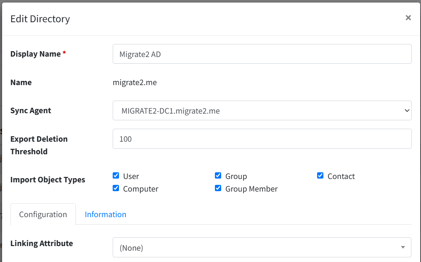
Option 2: Join the PowerSyncPro server to the target domain
If you are not utilizing Remote Sync Agents and are running all sync operations directly from the central PowerSyncPro server, you must join the server to the target domain.
⚠️ Important service account warning
PowerSyncPro encrypts sensitive elements in its database using a key tied to its service account. If the PowerSyncPro Windows service currently runs as a service account from another domain, changing this context to join the target domain can render your existing encrypted database data unreadable. If you are not running as Local System or a local account, contact PowerSyncPro support before changing the service account context.
- Join the PowerSyncPro Server directly to the target Active Directory domain.
- Restart the server and verify that the PowerSyncPro starts sucessfully.
- Re-run your SID History synchronization job.