
Contact Sales

To contact our sales team, you can use the form below. Do not use this form for tickets or help desk, click here to create a ticket.

Synchronise and migrate users and workstation between on-prem AD, Entra ID, Google the easy way. Seamlessly Move devices between AD Joined, Hybrid and Entra Joined.
  • Create ticket
  • Home
  • Install and Configure

Error Creating Bulk Enrolment Token: No flow token provided

How to fix the no flow token provided error when trying to generate a bulk enrolment token for a directory

Written by Ethan Robinson

Updated at May 19th, 2026

Contact Sales

To contact our sales team, you can use the form below. Do not use this form for tickets or help desk, click here to create a ticket.

  • Getting Started
  • FAQs
  • API Documentation
  • Integrations
  • Migration Agent
  • Directory Synchronisation
  • Remote DC agent
  • Remote Password Sync Agent
  • Install and Configure
  • Support
  • Complex Expressions
+ More

Table of Contents

Introduction Error Cause: Resolution:

Introduction

After adding a Entra ID tenant to your PowerSyncPro server, you will need to generate a bulk enrolment token for said tenant. The steps to do this are well documented in our documentation. But this article will focus on a particular error when generating this bulk enrolment token.

Error
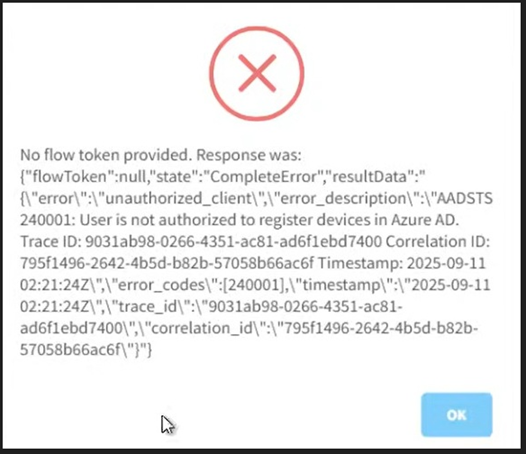
No flow token provided

Cause:

  • If the Entra Device limit is not set to unlimited, this error may occur.
  • If Multi-Factor-Authentication is set to required, this issue may also occur.

Resolution:

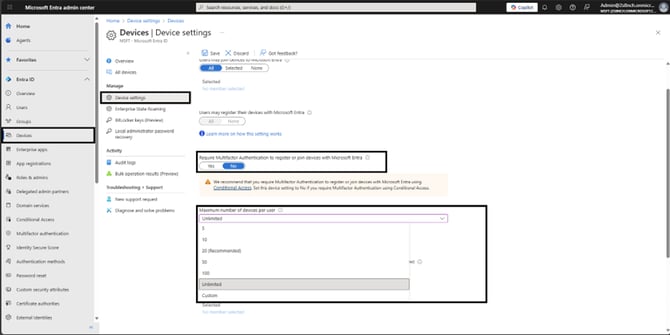
  1. Login to your Entra ID tenant to access the admin portal
  2. Navigate to Devices → Device settings
  3. Ensure “Require Multifactor authentication to register or join devices with Entra” is set to no
  4. Under “Maximum number of devices per user” and select the “unlimited” option from the dropdown box.
 

enrolment token flow token

Was this article helpful?

Yes
No
Give feedback about this article

Related Articles

  • Bulk Token Retrieval Failed (AADSTS90092)
  • Attempting to generate a Bulk Enrolment Token returns blank browser window
  • Agent Register initial request failed: Machine not in PSP

Subscribe to Newsletter

Drop your email in the box below to sign up. We promise to keep our updates relevant and useful – and we’ll never share your details.

PowerSyncPro's logo

PowerSyncPro is the ultimate product for easing the pain and frustration during mergers, acquisitions, divestitures, and consolidations.

Terms & Conditions

  • FAQs
  • Privacy Policy
  • Cookies
  • Anti Slavery Notice

PowerSyncPro

  • Case Studies
  • Contact sales
  • Marketplace
  • EULA

Get Connected

Room 73, Wrest House, Wrest Park, Silsoe, Bedford, England, MK45 4HR
info@powersyncpro.com

Twitter Youtube Linkedin

Expand