A Trusted Platform Module (TPM) is a small, security-focused component in a computer that can create, store and protect cryptographic keys. Think of it as a hardware-backed safe for secrets. It is possible for the device identity and TPM-backed key to be recognized by Entra.
To Entra Join into the TPM a PPKG file (Windows provisioning package .ppkg) must be used. PowerSyncPro can create the ppkg file on the fly using the BPRT generated from the directory config, this will be the only config in the PPKG file. You do not need to use the Windows Configuration Designer (WCD | WICD).
PowerSyncPro uses the BPRT as the default join method to increase reliability and resilience of the migration, in actual fact, from the million devices we have migrated, there have been zero support tickets, bugs or defects related to problems using BPRT, it just works.
Package files (.ppkg) have a level of local uncertainty on the windows machines (under 5%), so increased testing and monitoring is required in your specific environment. Typically you might need to visit the machine to resolve any issues, or perform enhanced testing to create pre migration scripts to resolve any specific environmental challenges.
If the below options does not exist in your version you should upgrade, you will need to upgrade the PowerSyncPro server and migration agent on all your windows endpoints to be able to use these methods.
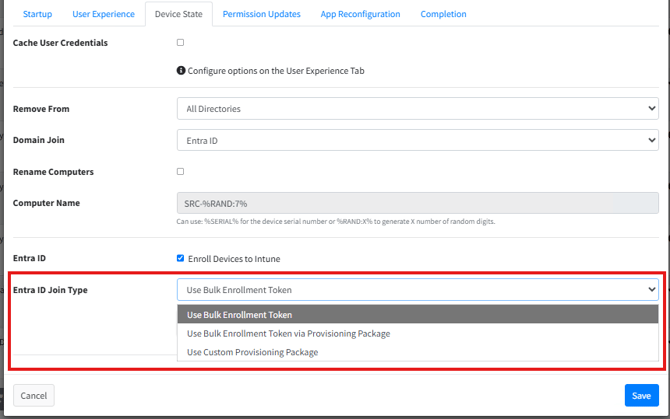
The Entra ID Join Type options are:
| Entra ID Join Type | Will TPM join | Comment |
| Use Bulk Enrollment Token | No | Increased resilience and reliability with zero support tickets reported |
| Use Bulk Enrollment Token via Provisioning Package | Yes | Will create PPKG on the fly |
| Use Custom Provisioning Package | Yes | Your can construct your own PPKG file which may conflict with PowerSyncPro features, contact support to enable this via feature flag. |
Here are the features on the runbook: