US English (US)
GB English (UK)

Contact Us

If you still have questions or prefer to get help directly from an agent, please submit a request.
We’ll get back to you as soon as possible.

Please fill out the contact form below and we will reply as soon as possible.

  • Create ticket
English (US)
US English (US)
GB English (UK)
  • Home

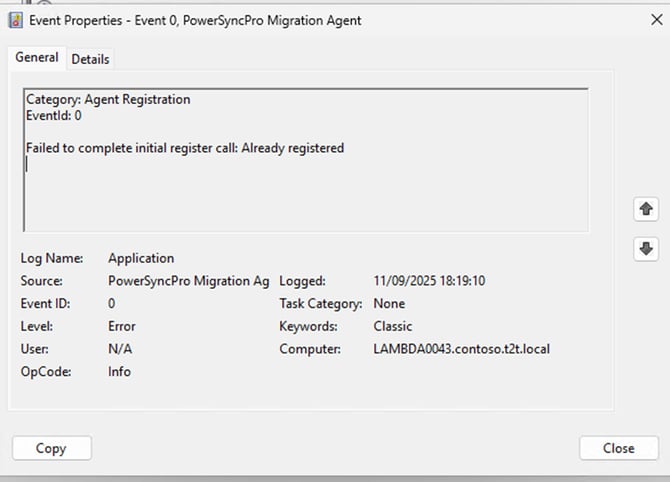
Failed to complete initial register call: Already registered

Learn how to register the Migration Agent on a device which has the agent installed on it previously

Written by Ethan Robinson

Updated at September 12th, 2025

Contact Us

If you still have questions or prefer to get help directly from an agent, please submit a request.
We’ll get back to you as soon as possible.

Please fill out the contact form below and we will reply as soon as possible.

  • Getting Started
  • FAQs
  • API Documentation
  • Integrations
  • Migration Agent
  • Directory Synchronisation
  • Remote DC agent
  • Remote Password Sync Agent
  • Install and Configure
  • Support
  • Complex Expressions
+ More

Table of Contents

Summary Content The cause: The fix:

Summary

This error indicates that the agent has been installed on the workstation already and was already registered, the likely cause is the remaining registry keys on the machine are the likely cause.


Content

Failed to complete initial register call: Already registered

The cause:

  • This means that the Agent has been installed on the Workstation already and registered to the PSP Database.
  •  Most likely scenario is that the Agent has been uninstalled from the Workstation, and the Declaration Software Registry keys have been deleted.


The fix:

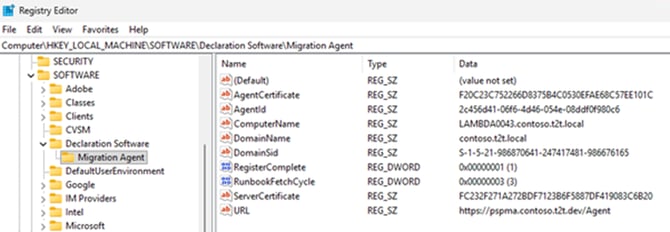
1.Uninstall the Migration Agent from the workstation and navigate to the following path in the registry editor: Computer\HKEY_LOCAL_MACHINE\SOFTWARE\Declaration Software\Migration Agent

2. Delete the Migration agent folder with the registry keys

3. If you see “Already Registered” in the event logs that you will need to DELETE the agent from the PSP console and then attempt to register.

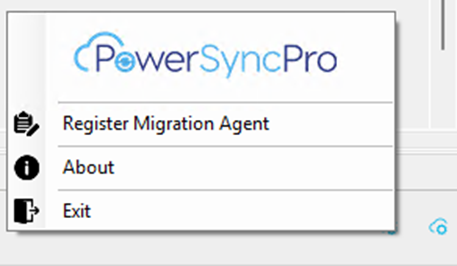
4. Then reinstall the agent on the workstation, navigate to the Migration Agent tray app right click and select “Register Migration Agent”


unsuccessful registration duplicate registration

Was this article helpful?

Yes
No
Give feedback about this article

Related Articles

  • Migration Agent is not starting or registering on a device
  • Clean uninstall of PowerSyncPro Migration Agent
  • Create PowerSyncPro Entra ID App Registration

Subscribe to Newsletter

Drop your email in the box below to sign up. We promise to keep our updates relevant and useful – and we’ll never share your details.

PowerSyncPro is the ultimate product for easing the pain and frustration during mergers, acquisitions, divestitures, and consolidations.

Terms & Conditions

  • FAQs
  • Privacy Policy
  • Cookies
  • Anti Slavery Notice

PowerSyncPro

  • Case Studies
  • Contact sales
  • Meet the Team
  • EULA

Get Connected

Room 73, Wrest House, Wrest Park, Silsoe, Bedford, England, MK45 4HR
info@powersyncpro.com

Twitter Youtube Linkedin

Knowledge Base Software powered by Helpjuice

Expand