PowerSyncPro should be implemented by a certified Partner to ensure your project is successful. This is important as you are configuring identity and devices which are the bedrock of your environment.
Please contact us so we can put you in contact with a certified partner for your geography, or if you already have a partner, we are happy to onboard them to be certified. Get in contact!
PowerSyncPro Directory Synchronisation (PSP DirSync)
- All DirSync features are available to install and configure without a license except the Export feature, which commits changes to the target.
- PowerSyncPro is licensed per user for 1 year from license generation, we reconcile yearly
- Licenses are not consumed by a user, so given churn, a new starter is allowed to take over a license form a leaver
- The source Google, Active Directory (AD), or Entra ID (onmicrosoft.com address) and the target Active Directory (AD) or Entra ID (onmicrosoft.com address) is required when you place your order and is tattooed into the license
- Groups do not consume a license.
PowerSyncPro Migration Agent (PSP MA)
- All Migration Agent features are available without a license, you can configure everything and prepare, except the device will not receive Runbooks until the server is licensed
- If the license expires after the device receives its runbooks, then the device may not migrate, or may not report its status.
- Your server has the feature enabled for 1 year from license generation, we reconcile yearly
- Full Directory synchronisation features are included in the Migration Agent License for match only (no export), to create the translation table.
- A device can be migrated multiple times with different runbooks.
- Details on the source and target Active Directory (AD) and/or Entra ID (onmicrosoft.com address) is required when you place your order and is tattooed into the license, this will then allow the migration of the devices on those environments.
Test licenses
- We will provide licensing for free for up to 5 windows machine if the source and target environment are clearly labelled as such without ambiguity as test environment. Cut your own license here https://licence.mypsp.io/getmypoc and follow our getting started page to fully understand how to implement
- It is also critically important to test migrations in your production environment once you have received your production license, as test and production will be different.
How to apply a license to the PowerSyncPro server
PowerSyncPro is free to download, install and configure as IaaS software, we also have a marketplace image and installation script. You can simulate configuring your environment and review the actions PowerSyncPro would take if licensed by witnessing the powerful What-If feature.
To migrate workstations using Migration Agent or “export” object (write/update/create objects) in directory synchronisation you will need to purchase a license.
Issues applying your license?
Reach out to your sales representative or distributor.
Where to purchase a license
Purchase a license directly with PowerSyncPro, there are three ways to do this
- For under 500 Workstation migrations only (no DirSync) buy direct on our Pricing page in GBP, EUR or USD.
- We will provide licensing for free for up to 5 windows machine if the source and target environment are clearly labelled as such without ambiguity as test environment. Cut your own license here https://licence.mypsp.io/getmypoc and follow our getting started page to fully understand how to implement
- For any other requirements, including bundles and directory synchronisation contact our Sales team
- You will receive your server license key direct from our sales team.
Support when purchasing directly via PowerSyncPro
Technical support will be direct with the PowerSyncPro team via the link at the top of the page or here
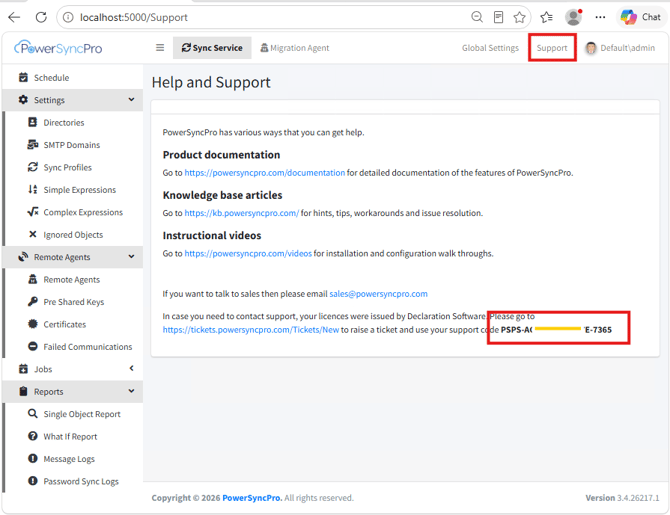
You will need the support code from the support page on your PowerSyncPro GUI to create a support ticket (click Support at the top right)
PowerSyncPro does not offer consultancy or advice on your implementation, please talk to one of our trusted partners for this. “Quick start” offering is an installation-only over the shoulder service. You be able to follow our getting started and documentation page for everything you need.
Coupons
Our reseller BitTitan also offers PowerSyncPro IaaS as a bolt-on companion to MigrationWiz.
- When purchased via BitTitan (or one of their distributors) you will receive a short “coupon code” dedicated for PowerSyncPro, visit https://license.mypsp.io/redeem to generate the server license key
- Coupon codes cannot be used on the PowerSyncPro server directly, you must convert them to a server license.
Support when purchasing with our reseller BitTitan (or one of their distributors)
Technical support will be direct with the BitTitan team, start here https://help.bittitan.com/
If you have purchased advanced support still start your support ticket with BitTitan and they can escalate to us if needed.
If you have purchased “Quick start” though BitTitan, talk to your sales representative and they will trigger the process internally, PowerSyncPro will then reach out to you.
How to apply the server license key on PowerSyncPro server.
The license key will look something like this invalid key, which will be specific to your environment:
lgCAgPKiLme5wdwBpDBAbGllbnROYW1lPSNTb3VyY2VEb21haW5zPWR1bW15LmFkI1RhcmdldERvbWFpbnM9ZHVtbXkuYWQjTWlncmF0adW9uRGV2aWNlQ291bnQ9MSNNaWdyYXRpb25FeHBpcnk9MjNy0wNC0wMSNJc3N1ZXI9UG93ZXJTeW5jUHJabcvI1N1cHBvcnRDb2RlPVBTUFMtMUNDRS0xNjc0LTY1QTdkt0MgECEB1xcaGQn9xsPo4knWWXFBznRBgNz+K4cIly884pQUkacPxPZcZNNHjWjHGtopjtOpESEYAsZ+N9ccI0ZZu8anbcATnS44K7Xs16VDaVLfnN5YJpiKxIrkpHQK0xTz+JpR15AZr+x6/RgPNYqUTxGVd9+LzxPrkZXGTs6jAjf3YMHHF2mMHFhNVlN0Pdo72FIdXYp7a3T8vki2RhKANBygx4WxAAIGKrc02BhrG6GxOdt3RDVes/7qI3ji6EOsahABCFqn2HhfG+5TzborlzmdHf4xdKd87/TuCrtofcOdysnnRaZaryGikvM3G5MUOghdYA3aWE8fAFs/d1si2sUtf2isR1M=
When logged into PowerSyncPro as an admin, click on "Global Settings" then “Licenses”
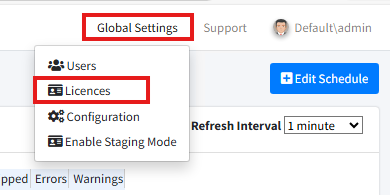
Click on “Add”, then paste your server license key in, and click “Save”

Support
Here's how PowerSyncPro support works — it depends on where your licenses were purchased.
If you purchased through BitTitan or one of their resellers
Your support journey always starts with them. As the licenses weren't bought directly from PowerSyncPro, we're unable to take support requests from you directly. Please raise your query with BitTitan in the first instance.
If you purchased directly through PowerSyncPro sales or our website
You're welcome to log tickets with us directly, you will need a valid support code to do this (click Support at the top right of your installation). Direct support covers remote, email-only assistance with errors and configuration issues.
Additional support options
- Advanced support — Screen sharing is available to help diagnose errors, and BitTitan can escalate to us where needed. Please raise your ticket first with whoever supplied your licenses.
- Quick Start — Hands-on assistance installing PowerSyncPro. Where this has been purchased, BitTitan will pass the request directly to PowerSyncPro, they will validate and trigger this request.
Please note that none of these options include consultancy to design or implement your migration or dirsync strategy, PowerSyncPro does not offer such services, please talk to one of our Partners.
Finding your support code
If submitting a support ticket (if you have purchased directly through PowerSyncPro), you will need your support code from a licensed enlightened installation, this support code is associated to your purchase with PowerSyncPro (Declaration Software).
Find the support code from the support page in your installation